 English

资源说明:CodeRunner: A moodle quiz question type that runs student-submitted program code in a sandbox to check if it satisfies a given set of tests.
# CodeRunner
Version: 4.2.3 February 2022
Authors: Richard Lobb, University of Canterbury, New Zealand.
Tim Hunt, The Open University, UK.
NOTE: A few sample quizzes containing example CodeRunner questions
are available at [coderunner.org.nz](http://coderunner.org.nz). There's also
[a forum](http://coderunner.org.nz/mod/forum/view.php?id=51) there, where you
can post CodeRunner questions, such as
requests for help if things go wrong, or are looking for ideas on how to write some
unusual question type.
**Table of Contents** *generated with [DocToc](https://github.com/thlorenz/doctoc)*
- [Introduction](#introduction)
- [Installation](#installation)
- [Installing CodeRunner](#installing-coderunner)
- [Upgrading from earlier versions of CodeRunner](#upgrading-from-earlier-versions-of-coderunner)
- [Preliminary testing of the CodeRunner question type](#preliminary-testing-of-the-coderunner-question-type)
- [Setting the quiz review options](#setting-the-quiz-review-options)
- [Sandbox Configuration](#sandbox-configuration)
- [Running the unit tests](#running-the-unit-tests)
- [The Architecture of CodeRunner](#the-architecture-of-coderunner)
- [Question types](#question-types)
- [An example question type](#an-example-question-type)
- [Built-in question types](#built-in-question-types)
- [Some more-specialised question types](#some-more-specialised-question-types)
- [Templates](#templates)
- [Per-test templates](#per-test-templates)
- [Combinator templates](#combinator-templates)
- [Customising templates](#customising-templates)
- [Template debugging](#template-debugging)
- [Using the template as a script for more advanced questions](#using-the-template-as-a-script-for-more-advanced-questions)
- [Twig Escapers](#twig-escapers)
- [Template parameters](#template-parameters)
- [Twigging the whole question](#twigging-the-whole-question)
- [Preprocessing of template parameters](#preprocessing-of-template-parameters)
- [Preprocessing with Twig](#preprocessing-with-twig)
- [Preprocessing with other languages](#preprocessing-with-other-languages)
- [The template parameter preprocessor program](#the-template-parameter-preprocessor-program)
- [The Evaluate per run option](#the-evaluate-per-run-option)
- [The Twig TEST variable](#the-twig-test-variable)
- [The Twig TESTCASES variable](#the-twig-testcases-variable)
- [The Twig QUESTION variable](#the-twig-question-variable)
- [The Twig STUDENT variable](#the-twig-student-variable)
- [Twig macros](#twig-macros)
- [Randomising questions](#randomising-questions)
- [How it works](#how-it-works)
- [Randomising per-student rather than per-question-attempt](#randomising-per-student-rather-than-per-question-attempt)
- [An important warning about editing template parameters](#an-important-warning-about-editing-template-parameters)
- [Hoisting the template parameters](#hoisting-the-template-parameters)
- [Miscellaneous tips](#miscellaneous-tips)
- [Grading with templates](#grading-with-templates)
- [Per-test-case template grading](#per-test-case-template-grading)
- [Combinator-template grading](#combinator-template-grading)
- [Template grader examples](#template-grader-examples)
- [A simple grading-template example](#a-simple-grading-template-example)
- [A more advanced grading-template example](#a-more-advanced-grading-template-example)
- [Customising the result table](#customising-the-result-table)
- [Column specifiers](#column-specifiers)
- [HTML formatted columns](#html-formatted-columns)
- [Extended column specifier syntax (*obsolescent*)](#extended-column-specifier-syntax-obsolescent)
- [Default result columns](#default-result-columns)
- [User-interface selection](#user-interface-selection)
- [The Graph UI](#the-graph-ui)
- [The Table UI](#the-table-ui)
- [The Gap Filler UI](#the-gap-filler-ui)
- [The Ace Gap Filler UI](#the-ace-gap-filler-ui)
- [The Html UI](#the-html-ui)
- [The textareaId macro](#the-textareaid-macro)
- [Other UI plugins](#other-ui-plugins)
- [User-defined question types](#user-defined-question-types)
- [Prototype template parameters](#prototype-template-parameters)
- [Supporting or implementing new languages](#supporting-or-implementing-new-languages)
- [Multilanguage questions](#multilanguage-questions)
- [The 'qtype_coderunner_run_in_sandbox' web service](#the-qtype_coderunner_run_in_sandbox-web-service)
- [Enabling and configuring the web service](#enabling-and-configuring-the-web-service)
- [Use of the web service.](#use-of-the-web-service)
- [Administrator scripts](#administrator-scripts)
- [A note on accessibility](#a-note-on-accessibility)
- [APPENDIX 1: How questions get marked](#appendix-1-how-questions-get-marked)
- [When a question is first instantiated.](#when-a-question-is-first-instantiated)
- [Grading a submission](#grading-a-submission)
- [Lots more to come when I get a round TUIT](#lots-more-to-come-when-i-get-a-round-tuit)
- [APPENDIX 2: How programming quizzes should work](#appendix-2-how-programming-quizzes-should-work)
## Introduction
CodeRunner is a Moodle question type that allows teachers to run a program in
order to grade a student's answer. By far the most common use of CodeRunner is
in programming courses where students are asked to write program code to some
specification and that code is then graded by running it in a series of tests.
CodeRunner questions have also been used in other areas of computer science and
engineering to grade questions in which a program must be used to assess correctness.
Regardless of the behaviour chosen for a quiz, CodeRunner questions always
run in an adaptive mode, in which students can click a Check button to see
if their code passes the tests defined in the question. If not, students can
resubmit, typically for a small penalty. In the typical 'all-or-nothing' mode,
all test cases must pass if the submission is to be awarded any marks.
The mark for a set of questions in a quiz is then determined primarily by
which questions the student is able to solve successfully and then secondarily
by how many submissions the student makes on each question.
However, it is also possible to configure CodeRunner questions so
that the mark is determined by how many of the tests the code successfully passed.
CodeRunner has been in use at the University of Canterbury for over ten years
running many millions of student quiz question submissions in Python, C , JavaScript,
PHP, Octave and Matlab. It is used in laboratory work, assignments, tests and
exams in multiple courses. In recent years CodeRunner has spread around the
world and as of January 2021 is installed on over 1800 Moodle sites worldwide
(see [here](https://moodle.org/plugins/stats.php?plugin=qtype_coderunner)), with
at least some of its language strings translated into 19 other languages (see
[here](https://moodle.org/plugins/translations.php?plugin=qtype_coderunner])).
CodeRunner supports the following languages: Python2 (considered obsolete),
Python3, C, C++, Java, PHP, Pascal, JavaScript (NodeJS), Octave and Matlab.
However, other languages are easily supported without altering the source
code of either CodeRunner or the Jobe server just by scripting
the execution of the new language within a Python-based question.
CodeRunner can safely be used on an institutional Moodle server,
provided that the sandbox software in which code is run ("Jobe")
is installed on a separate machine with adequate security and
firewalling. However, if CodeRunner-based quizzes are to be used for
tests and final exams, a separate Moodle server is recommended, both for
load reasons and so that various Moodle communication facilities, like
chat and messaging, can be turned off without impacting other classes.
The most recent version of CodeRunner specifies that it requires Moodle version 3.9 or later,
but previous releases support Moodle version 3.0 or later. The current version
should work with older versions of Moodle 3.0 or later, too, provided they are
running PHP V7.2 or later. CodeRunner is developed
and tested on Linux only, but Windows-based Moodle sites have also used it.
Submitted jobs are run on a separate Linux-based machine, called the
[Jobe server](https://github.com/trampgeek/jobe), for security purposes.
CodeRunner is initially configured to use a small, outward-facing Jobe server
at the University of Canterbury, and this server can
be used for initial testing; however, the Canterbury server is not suitable
for production use. Institutions will need to install and operate their own Jobe server
when using CodeRunner in a production capacity.
Instructions for installing a Jobe server are provided in the Jobe documentation.
Once Jobe is installed, use the Moodle administrator interface for the
CodeRunner plug-in to specify the Jobe host name and port number.
A [Docker Jobe server image](https://hub.docker.com/r/trampgeek/jobeinabox) is also available.
A modern 8-core Moodle server can handle an average quiz question
submission rate of well over 1000 Python quiz questions per minute while maintaining
a response time of less than 3 - 4 seconds, assuming the student code
itself runs in a fraction of a second. We have run CodeRunner-based exams
with nearly 500 students and experienced only light to moderate load factors
on our 8-core Moodle server. The Jobe server, which runs student submissions
(see below), is even more lightly loaded during such an exam.
Some videos introducing CodeRunner and explaining question authoring
are available in [this youtube channel](https://coderunner.org.nz/mod/url/view.php?id=472).
## Installation
This chapter describes how to install CodeRunner. It assumes the
existence of a working Moodle system, version 3.0 or later.
### Installing CodeRunner
CodeRunner requires two separate plug-ins, one for the question type and one
for the specialised adaptive behaviour. The plug-ins are in two
different github repositories: `github.com/trampgeek/moodle-qbehaviour_adaptive_adapted_for_coderunner`
and `github.com/trampgeek/moodle-qtype_coderunner`. Install the two plugins
using one of the following two methods.
EITHER:
1. Download the zip file of the required branch from the [coderunner github repository](https://github.com/trampgeek/moodle-qtype_coderunner)
unzip it into the directory `moodle/question/type` and change the name
of the newly-created directory from `moodle-qtype_coderunner-` to just
`coderunner`. Similarly download the zip file of the required question behaviour
from the [behaviour github repository](https://github.com/trampgeek/moodle-qbehaviour_adaptive_adapted_for_coderunner),
unzip it into the directory `moodle/question/behaviour` and change the
newly-created directory name to `adaptive_adapted_for_coderunner`.
OR
1. Get the code using git by running the following commands in the
top level folder of your Moodle install:
git clone https://github.com/trampgeek/moodle-qtype_coderunner.git question/type/coderunner
git clone https://github.com/trampgeek/moodle-qbehaviour_adaptive_adapted_for_coderunner.git question/behaviour/adaptive_adapted_for_coderunner
Either way you may also need to change the ownership
and access rights to ensure the directory and
its contents are readable by the webserver.
You can then complete the
installation by logging onto the server through the web interface as an
administrator and following the prompts to upgrade the database as appropriate.
In its initial configuration, CodeRunner is set to use a University of
Canterbury [Jobe server](https://github.com/trampgeek/jobe) to run jobs. You are
welcome to use this during initial testing, but it is
not intended for production use. Authentication and authorisation
on that server is
via an API-key and the default API-key given with CodeRunner imposes
a limit of 100
per hour over all clients using that key, worldwide. If you decide that CodeRunner is
useful to you, *please* set up your own Jobe sandbox as
described in *Sandbox configuration* below.
WARNING: at least a couple of users have broken CodeRunner by duplicating
the prototype questions in the System/CR\_PROTOTYPES category. `Do not` touch
those special questions until you have read this entire manual and
are familiar with the inner workings of CodeRunner. Even then, you should
proceed with caution. These prototypes are not
for normal use - they are akin to base classes in a prototypal inheritance
system like JavaScript's. If you duplicate a prototype question the question
type will become unusable, as CodeRunner doesn't know which version of the
prototype to use.
### Upgrading from earlier versions of CodeRunner
Upgrading CodeRunner versions from version 2.4 or later onwards should generally be
straightforward though, as usual, you should make a database backup before
upgrading. To upgrade, simply install the latest code and login to the web
interface as an administrator. When Moodle detects the
changed version number it will run upgrade code that updates all questions to
the latest format.
However, if you have written your own question types
you should be aware that all existing questions in the system
`CR_PROTOTYPES` category with names containing the
string `PROTOTYPE_` are deleted by the installer/upgrader.
The installer then re-loads them from the file
db/questions-CR_PROTOTYPES.xml
Hence if you have developed your own question prototypes and placed them in
the system `CR_PROTOTYPES` category (not recommended) you must export them
in Moodle XML format before upgrading. You can then re-import them after the
upgrade is complete using the usual question-bank import function in the
web interface. However, it is strongly recommended that you do not put your
own question prototypes in the `CR_PROTOTYPES` category but create a new
category for your own use.
### Preliminary testing of the CodeRunner question type
Once you have installed the CodeRunner question type, you should be able to
run CodeRunner questions using the University of Canterbury's Jobe Server
as a sandbox. It is
recommended that you do this before proceeding to install and configure your
own sandbox.
Using the standard Moodle web interface, either as a Moodle
administrator or as a teacher in a course you have set up, go to the Question
Bank and try creating a new CodeRunner question. A simple Python3 test question
is: "Write a function *sqr(n)* that returns the square of its
parameter *n*.". The introductory quick-start guide in the incomplete
[Question Authoring Guide](https://github.com/trampgeek/moodle-qtype_coderunner/blob/master/authorguide.md)
gives step-by-step instructions for creating such a question. Alternatively
you can just try to create a question using the on-line help in the question
authoring form. Test cases for the question might be:
Test Expected print(sqr(-7)) 49 print(sqr(5)) 25 print(sqr(-1)) 1 print(sqr(0)) 0 print(sqr(-100)) 10000
You could check the 'UseAsExample' checkbox on the first two (which results
in the student seeing a simple "For example" table) and perhaps make the last
case a hidden test case. (It is recommended that all questions have at least
one hidden test case to prevent students synthesising code that works just for
the known test cases).
Save your new question, then preview it, entering both correct and
incorrect answers.
If you want a few more CodeRunner questions to play with, try importing the
files
`MoodleHome>/question/type/coderunner/samples/simpledemoquestions.xml` and/or
`MoodleHome>/question/type/coderunner/samples/python3demoquestions.xml`.
These contains
most of the questions from the two tutorial quizzes on the
[demo site](http://www.coderunner.org.nz).
If you wish to run the questions in the file `python3demoquestions.xml`,
you will also need to import
the file `MoodleHome>/question/type/coderunner/samples/uoc_prototypes.xml`
or you will receive a "Missing prototype" error.
Also included in the *samples* folder is a prototype question,
`prototype\_c\_via\_python.xml`
that defines a new question type, equivalent to the built-in *c\_program*
type, by scripting in Python the process of compiling and running the student
code. This is a useful template for authors who wish to implement their own
question types or who need to support non-built-in languages. It is discussed
in detail in the section "Supporting or implementing new languages".
### Setting the quiz review options
It is important that students get shown the result table when they click *Check*.
In Moodle quiz question parlance, the result table is called the question's *Specific
feedback* and the quiz review options normally control when that feedback should
be displayed to the student. By default, however, CodeRunner always displays this
result table; if you wish to have the quiz review options control when it is
shown you must change the *Feedback* drop-down in the question author form from
its default *Force show* to *Set by quiz*.
Some recommended setting in the "During the attempt" column of the quiz review
options are:
1. Right answer. This should be unchecked, at least in the "During the attempt"
column and possibly elsewhere, if you don't want your sample answers leaked
to the whole class.
1. Whether correct. This should probably be unchecked if the quiz includes
any non-coderunner questions. It doesn't appear to affect CodeRunner
feedback but if left checked will result in other questions types
displaying an excessive amount of help when *Check* is clicked.
1. Marks and General feedback. These should probably be checked.
### Sandbox Configuration
Although CodeRunner has a flexible architecture that supports various different
ways of running student task in a protected ("sandboxed") environment, only
one sandbox - the Jobe sandbox - is supported by the current version. This
sandbox makes use of a
separate server, developed specifically for use by CodeRunner, called *Jobe*.
As explained
at the end of the section on installing CodeRunner from scratch, the initial
configuration uses the Jobe server at the University of Canterbury. This is not
suitable for production use. Please switch
to using your own Jobe server as soon as possible.
To build a Jobe server, follow the instructions at
[https://github.com/trampgeek/jobe](https://github.com/trampgeek/jobe). Then use the
Moodle administrator interface for the CodeRunner plug-in to specify the Jobe
host name and perhaps port number. Depending on how you've chosen to
configure your Jobe server, you may also need to supply an API-Key through
the same interface.
A video walkthrough of the process of setting up a Jobe server
on a DigitalOcean droplet, and connecting an existing CodeRunner plugin to it, is
available [here](https://www.youtube.com/watch?v=dGpnQpLnERw).
An alternative and generally much faster way to set up a Jobe server is to use
the Docker image [*jobeinabox*](https://hub.docker.com/r/trampgeek/jobeinabox).
Because it is containerised, this version of Jobe is even more secure. The only
disadvantage is that is is more difficult to manage
the code or OS features within the Jobe container, e.g. to install new languages in it.
If you intend running unit tests you
will also need to copy the file `tests/fixtures/test-sandbox-config-dist.php`
to 'tests/fixtures/test-sandbox-config.php', then edit it to set the correct
host and any other necessary configuration for the Jobe server.
Assuming you have built *Jobe* on a separate server, suitably firewalled,
the JobeSandbox fully
isolates student code from the Moodle server. Some users install Jobe on
the Moodle server but this is not recommended for security reasons: a student
who manages to break out of the Jobe security might then run code on the
Moodle server itself if it is not adequately locked down. If you really want to
run Jobe on the Moodle server, please at least use the JobeInAbox docker image,
which should adequately protect the Moodle system from direct damage.
Do realise, though, that
unless the Moodle server is itself carefully firewalled, Jobe tasks are likely
to be able to open connections to other machines within your intranet or
elsewhere.
### Running the unit tests
If your Moodle installation includes the
*phpunit* system for testing Moodle modules, you might wish to test the
CodeRunner installation. Most tests require that at least python2 and python3
are installed.
Before running any tests you first need to copy the file
`/question/type/coderunner/tests/fixtures/test-sandbox-config-dist.php`
to '/question/type/coderunner/tests/fixtures/test-sandbox-config.php',
then edit it to set whatever configuration of sandboxes you wish to test,
and to set the jobe host, if appropriate. You should then initialise
the phpunit environment with the commands
cd
sudo php admin/tool/phpunit/cli/init.php
You can then run the full CodeRunner test suite with one of the following two commands,
depending on which version of phpunit you're using:
sudo -u www-data vendor/bin/phpunit --verbose --testsuite="qtype_coderunner test suite"
or
sudo -u www-data vendor/bin/phpunit --verbose --testsuite="qtype_coderunner_testsuite"
If you're on a Red Hat or similar system in which the web server runs as
*apache*, you should replace *www-data* with *apache.
The unit tests will almost certainly show lots of skipped or failed tests relating
to the various sandboxes and languages that you have not installed, e.g.
the LiuSandbox, Matlab, Octave and Java. These can all be ignored unless you plan to use
those capabilities. The name of the failing tests should be sufficient to
tell you if you need be at all worried.
Feel free to [email the principal developer](mailto:richard.lobb@canterbury.ac.nz) if you have problems
with the installation.
## The Architecture of CodeRunner
Although it's straightforward to write simple questions using the
built-in question types, anything more advanced than that requires
an understanding of how CodeRunner works.
The block diagram below shows the components of CodeRunner and the path taken
as a student submission is graded.
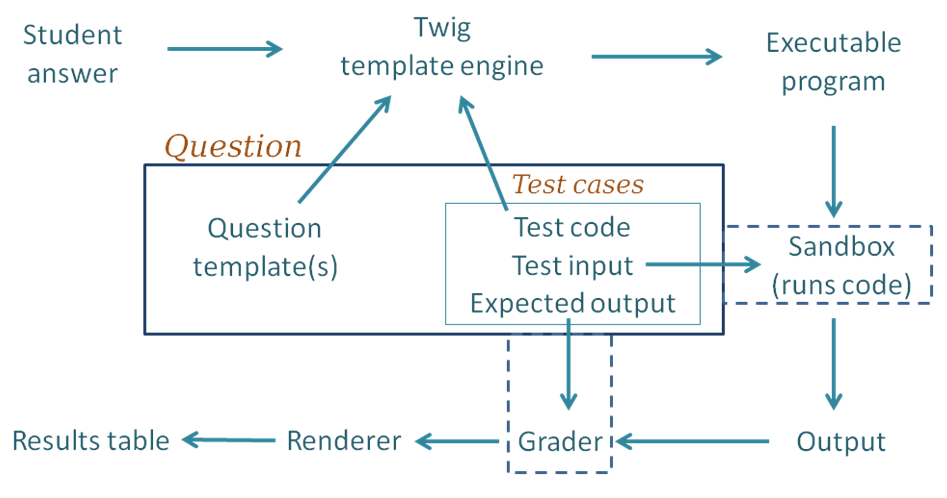 Following through the grading process step by step:
1. For each of the test cases, the [Twig template engine](http://twig.sensiolabs.org/)
merges the student's submitted answer with
the question's template together with code for this particular test case to yield an executable program.
By "executable", we mean a program that can be executed, possibly
with a preliminary compilation step.
1. The executable program is passed to the Jobe sandbox, which compiles
the program (if necessary) and runs it,
using the standard input supplied by the testcase.
1. The output from the run is passed into whatever Grader component is
configured, as is the expected output specified for the test case.
The most common grader is the
"exact match" grader but other types are available.
1. The output from the grader is a "test result object" which contains
(amongst other things) "Expected" and "Got" attributes.
1. The above steps are repeated for all testcases, giving an array of
test result objects (not shown explicitly in the figure).
1. All the test results are passed to the CodeRunner question renderer,
which presents them to the user as the Results Table. Tests that pass
are shown with a green tick and failing ones shown with a red cross.
Typically the whole table is coloured red if any tests fail or green
if all tests pass.
The above description is somewhat simplified, in the following ways:
* It is not always necessary to
run a different job in the sandbox for each test case. Instead, all tests can often
be combined into a single executable program. This is achieved by use of what is known as
a "combinator template" rather than the simpler "per-test template" described
above. Combinator templates are useful with questions of the *write-a-function*
or *write-a-class* variety. They are not often used with *write-a-program* questions,
which are usually tested with different standard inputs, so multiple
execution runs are required. Furthermore, even with write-a-function questions
that do have a combinator template,
CodeRunner will revert to running tests one-at-a-time (still using the combinator
template) if running all tests in the one program gives some form of runtime error,
in order that students can be
presented with all test results up until the one that failed.
Combinator templates are explained in the *Templates*
section.
* The question author can pass parameters to the
Twig template engine when it merges the question's template with the student answer
and the test cases. Such parameters add considerable flexibility to question
types, allow question authors to selectively enable features such
as style checkers and allowed/disallowed constructs. This functionality
is discussed in the [Template parameters](#template-parameters) section.
* The above description ignores *template graders*, where the question's
template includes code to do grading as well as testing. Template
graders support more advanced testing
strategies, such as running thousands of tests or awarding marks in more complex
ways than is possible with the standard option of either "all-or-nothing" marking
or linear summation of individual test marks.
A per-test-case template grader can be used to define each
row of the result table, or a combinator template grader can be used to
defines the entire feedback panel, with or without a result table.
See the section on [Grading with templates](#grading-with-templates) for
more information.
## Question types
CodeRunner support a wide variety of question types and can easily be
extended to support others. A CodeRunner question type is defined by a
*question prototype*, which specifies run time parameters like the execution
language and sandbox and also the template that define how a test program is built from the
question's test-cases plus the student's submission.
The prototype also
defines whether the correctness of the student's submission is assessed by use
of an *EqualityGrader*, a *NearEqualityGrader*, a *RegexGrader* or a
*TemplateGrader*.
* The EqualityGrader expects
the output from the test execution to exactly match the expected output
for the testcase.
* The NearEqualityGrader is similar but is case insensitive
and tolerates variations in the amount of white space (e.g. missing or extra
blank lines, or multiple spaces where only one was expected).
* The RegexGrader takes the *Expected* output as a regular expression (which
should not have PERL-type delimiters) and tries to find a match anywhere within
the output. Thus for example an expected value of 'ab.*z' would match any output that contains the
the characters 'ab' anywhere in the output and a 'z' character somewhere later.
To force matching of the entire output, start and end the regular expression
with '\A' and '\Z' respectively. Regular expression matching uses MULTILINE
and DOTALL options.
* Template graders are more complicated but give the question author almost
unlimited flexibility in controlling the execution, grading and result
display; see the section [Grading with templates](#grading-with-templates).
The EqualityGrader is recommended for most normal use, as it
encourages students to get their output exactly correct; they should be able to
resubmit almost-right answers for a small penalty, which is generally a
better approach than trying to award part marks based on regular expression
matches.
Test cases are defined by the question author to check the student's code.
Each test case defines a fragment of test code, the standard input to be used
when the test program is run and the expected output from that run. The
author can also add additional files to the execution environment.
The test program is constructed from the test case information plus the
student's submission using the template defined by the prototype. The template
can be either a *per-test template*, which defines a different program for
each test case or a *combinator template*, which has the ability to define a program that combines
multiple test cases into a single run. Templates are explained in the *Templates*
section.
### An example question type
The C-function question type expects students to submit a C function, plus possible
additional support functions, to some specification. As a trivial example, the question
might ask "Write a C function with signature `int sqr(int n)` that returns
the square of its parameter *n*". The author will then provide some test
cases, such as
printf("%d\n", sqr(-11));
and give the expected output from this test.
A per-test template for such a question type would then wrap the
submission and
the test code into a single program like:
#include
Following through the grading process step by step:
1. For each of the test cases, the [Twig template engine](http://twig.sensiolabs.org/)
merges the student's submitted answer with
the question's template together with code for this particular test case to yield an executable program.
By "executable", we mean a program that can be executed, possibly
with a preliminary compilation step.
1. The executable program is passed to the Jobe sandbox, which compiles
the program (if necessary) and runs it,
using the standard input supplied by the testcase.
1. The output from the run is passed into whatever Grader component is
configured, as is the expected output specified for the test case.
The most common grader is the
"exact match" grader but other types are available.
1. The output from the grader is a "test result object" which contains
(amongst other things) "Expected" and "Got" attributes.
1. The above steps are repeated for all testcases, giving an array of
test result objects (not shown explicitly in the figure).
1. All the test results are passed to the CodeRunner question renderer,
which presents them to the user as the Results Table. Tests that pass
are shown with a green tick and failing ones shown with a red cross.
Typically the whole table is coloured red if any tests fail or green
if all tests pass.
The above description is somewhat simplified, in the following ways:
* It is not always necessary to
run a different job in the sandbox for each test case. Instead, all tests can often
be combined into a single executable program. This is achieved by use of what is known as
a "combinator template" rather than the simpler "per-test template" described
above. Combinator templates are useful with questions of the *write-a-function*
or *write-a-class* variety. They are not often used with *write-a-program* questions,
which are usually tested with different standard inputs, so multiple
execution runs are required. Furthermore, even with write-a-function questions
that do have a combinator template,
CodeRunner will revert to running tests one-at-a-time (still using the combinator
template) if running all tests in the one program gives some form of runtime error,
in order that students can be
presented with all test results up until the one that failed.
Combinator templates are explained in the *Templates*
section.
* The question author can pass parameters to the
Twig template engine when it merges the question's template with the student answer
and the test cases. Such parameters add considerable flexibility to question
types, allow question authors to selectively enable features such
as style checkers and allowed/disallowed constructs. This functionality
is discussed in the [Template parameters](#template-parameters) section.
* The above description ignores *template graders*, where the question's
template includes code to do grading as well as testing. Template
graders support more advanced testing
strategies, such as running thousands of tests or awarding marks in more complex
ways than is possible with the standard option of either "all-or-nothing" marking
or linear summation of individual test marks.
A per-test-case template grader can be used to define each
row of the result table, or a combinator template grader can be used to
defines the entire feedback panel, with or without a result table.
See the section on [Grading with templates](#grading-with-templates) for
more information.
## Question types
CodeRunner support a wide variety of question types and can easily be
extended to support others. A CodeRunner question type is defined by a
*question prototype*, which specifies run time parameters like the execution
language and sandbox and also the template that define how a test program is built from the
question's test-cases plus the student's submission.
The prototype also
defines whether the correctness of the student's submission is assessed by use
of an *EqualityGrader*, a *NearEqualityGrader*, a *RegexGrader* or a
*TemplateGrader*.
* The EqualityGrader expects
the output from the test execution to exactly match the expected output
for the testcase.
* The NearEqualityGrader is similar but is case insensitive
and tolerates variations in the amount of white space (e.g. missing or extra
blank lines, or multiple spaces where only one was expected).
* The RegexGrader takes the *Expected* output as a regular expression (which
should not have PERL-type delimiters) and tries to find a match anywhere within
the output. Thus for example an expected value of 'ab.*z' would match any output that contains the
the characters 'ab' anywhere in the output and a 'z' character somewhere later.
To force matching of the entire output, start and end the regular expression
with '\A' and '\Z' respectively. Regular expression matching uses MULTILINE
and DOTALL options.
* Template graders are more complicated but give the question author almost
unlimited flexibility in controlling the execution, grading and result
display; see the section [Grading with templates](#grading-with-templates).
The EqualityGrader is recommended for most normal use, as it
encourages students to get their output exactly correct; they should be able to
resubmit almost-right answers for a small penalty, which is generally a
better approach than trying to award part marks based on regular expression
matches.
Test cases are defined by the question author to check the student's code.
Each test case defines a fragment of test code, the standard input to be used
when the test program is run and the expected output from that run. The
author can also add additional files to the execution environment.
The test program is constructed from the test case information plus the
student's submission using the template defined by the prototype. The template
can be either a *per-test template*, which defines a different program for
each test case or a *combinator template*, which has the ability to define a program that combines
multiple test cases into a single run. Templates are explained in the *Templates*
section.
### An example question type
The C-function question type expects students to submit a C function, plus possible
additional support functions, to some specification. As a trivial example, the question
might ask "Write a C function with signature `int sqr(int n)` that returns
the square of its parameter *n*". The author will then provide some test
cases, such as
printf("%d\n", sqr(-11));
and give the expected output from this test.
A per-test template for such a question type would then wrap the
submission and
the test code into a single program like:
#include
// --- Student's answer is inserted here ----
int main()
{
printf("%d\n", sqr(-11));
return 0;
}
which would be compiled and run for each test case. The output from the run would
then be compared with
the specified expected output (121) and the test case would be marked right
or wrong accordingly.
That example assumes the use of a per-test template rather than the more complicated
combinator template that is actually used by the built-in C function question type.
See the section
on [Templates](#templates) for more details.
### Built-in question types
The file `/question/type/coderunner/db/builtin_PROTOTYPES.xml`
is a moodle-xml export format file containing the definitions of all the
built-in question types. During installation, and at the end of any version upgrade,
the prototype questions from that file are all loaded into a category
`CR_PROTOTYPES` in the system context. A system administrator can edit
those prototypes but this is not recommended as the modified versions
will be lost on each upgrade. Instead, a category `LOCAL_PROTOTYPES`
(or other such name of your choice) should be created and copies of any prototype
questions that need editing should be stored there, with the question-type
name modified accordingly. New prototype question types can also be created
in that category. Editing of prototypes is discussed later in this
document.
Built-in question types include the following:
1. **c\_function**. This is the question type discussed in the above
example, except that it uses a combinator template. The student supplies
just a function (plus possible support functions) and each test is (typically) of the form
printf(format_string, func(arg1, arg2, ..))
The template for this question type generates some standard includes, followed
by the student code followed by a main function that executes the tests one by
one. However, if any of the test cases have any standard input defined, the
template is expanded and executed separately for each test case separately.
The manner in which a C (or any other) program is executed is not part of the question
type definition: it is defined by the particular sandbox to which the
execution is passed. The architecture of CodeRunner allows for the multiple
different sandboxes but currently only the Jobe sandbox is supported. It
uses the `gcc` compiler with the language set to
accept C99 and with both *-Wall* and *-Werror* options set on the command line
to issue all warnings and reject the code if there are any warnings.
1. **cpp\_function**. This is the C++ version of the previous question type.
The student supplies just a function (plus possible support functions)
and each test is (typically) of the form
cout << func(arg1, arg2, ..)
The template for this question type generates some standard includes, followed
by the line
using namespace std;
followed by the student code followed by a main function that executes the tests one by
one.
1. **c\_program** and **cpp\_program**. These two very simple question types
require the student to supply
a complete working program. For each test case the author usually provides
`stdin` and specifies the expected `stdout`. The program is compiled and run
as-is, and in the default all-or-nothing grading mode, must produce the right
output for all test cases to be marked correct.
1. **python3**. Used for most Python3 questions. For each test case, the student
code is run first, followed by the test code.
1. **python3\_w\_input**. A variant of the *python3* question in which the
`input` function is redefined at the start of the program so that the standard
input characters that it consumes are echoed to standard output as they are
when typed on the keyboard during interactive testing. A slight downside of
this question type compared to the *python3* type is that the student code
is displaced downwards in the file so that line numbers present in any
syntax or runtime error messages do not match those in the student's original
code.
1. **python2**. Used for most Python2 questions. As for python3, the student
code is run first, followed by the sequence of tests. This question type
should be considered to be obsolescent due to the widespread move to Python3
through the education community.
1. **java\_method**. This is intended for early Java teaching where students are
still learning to write individual methods. The student code is a single method,
plus possible support methods, that is wrapped in a class together with a
static main method containing the supplied tests (which will generally call the
student's method and print the results).
1. **java\_class**. Here the student writes an entire class (or possibly
multiple classes in a single file). The test cases are then wrapped in the main
method for a separate
public test class which is added to the students class and the whole is then
executed. The class the student writes may be either private or public; the
template replaces any occurrences of `public class` in the submission with
just `class`. While students might construct programs
that will not be correctly processed by this simplistic substitution, the
outcome will simply be that they fail the tests. They will soon learn to write
their
classes in the expected manner (i.e. with `public` and `class` on the same
line, separated by a single space)!
1. **java\_program**. Here the student writes a complete program which is compiled
then executed once for each test case to see if it generates the expected output
for that test. The name of the main class, which is needed for naming the
source file, is extracted from the submission by a regular expression search for
a public class with a `public static void main` method.
1. **octave\_function**. This uses the open-source Octave system to process
matlab-like student submissions.
1. **php**. A php question in which the student submission is a normal php
file, with PHP code enclosed in tags and the output is the
usual PHP output including all HTML content outside the php tags.
Other less commonly used built-in question types are:
*nodejs*, *pascal\_program* and *pascal\_function*.
As discussed later, this base set of question types can
be customised or extended in various ways.
### Some more-specialised question types
The following question types, used by the University
of Canterbury (UOC) are not part of the basic supported question type set.
They can be imported, if desired, from the file
`uoc_prototypes.xml`, located in the CodeRunner/coderunner/samples folder.
However, they come with no guarantees of correctness or on-going support.
The UOC question types include:
1. **python3\_cosc121**. This is a complex Python3 question
type that's used at the University of Canterbury for nearly all questions in
the COSC121 course. The student submission
is first passed through the [pylint](https://www.pylint.org/)
source code analyser and the submission is rejected if pylint gives any errors.
Otherwise testing proceeds as normal. Obviously, *pylint* needs to be installed
on the sandbox server. This question type takes many different template
parameters (see the section entitled *Template parameters* for an explanation
of what these are) to allow it to be used for a wide range of different problems.
For example, it can be configured to require or disallow specific language
constructs (e.g. when requiring students to rewrite a *for* loop as a *while*
loop), or to limit function size to a given value, or to strip the *main*
function from the student's code so that the support functions can be tested
in isolation. Details on how to use this question type, or any other, can
be found by expanding the *Question Type Details* section in the question
editing page.
1. **matlab\_function**. Used for Matlab function questions. Student code must be a
function declaration, which is tested with each testcase. The name is actually
a lie, as this question type now uses Octave instead, which is much more
efficient and easier for the question author to program within the CodeRunner
context. However, Octave has many subtle differences
from Matlab and some problems are inevitable. Caveat emptor.
1. **matlab\_script**. Like matlab\_function, this is a lie as it actually
uses Octave. It runs the test code first (which usually sets up a context)
and then runs the student's code, which may or may not generate output
dependent on the context. Finally the code in Extra Template Data is run
(if any). Octave's `disp` function is replaced with one that emulates
Matlab's more closely, but, as above: caveat emptor.
## Templates
Templates are the key to understanding how a submission is tested. Every question
has a template, either imported from the question type or explicitly customised,
which defines how the executable program is constructed from the student's
answer, the test code and other custom code within the template itself.
The template for a question is by default defined by the CodeRunner question
type, which itself is defined by a special "prototype" question, to be explained later.
You can inspect the template of any question by clicking the customise box in
the question authoring form.
A question's template can be either a *per-test template* or a *combinator
template*. The first one is the simpler; it is applied once for every test
in the question to yield an executable program which is sent to the sandbox.
Each such execution defines one row of the result table. Combinator templates,
as the name implies, are able to combine multiple test cases into a single
execution, provided there is no standard input for any of the test cases. We
will discuss the simpler per-test template first.
### Per-test templates
A *per\_test\_template* is essentially a program with "placeholders" into which
are inserted the student's answer and the test code for the test case being run.
The expanded template is then sent to the sandbox where it is compiled (if necessary)
and run with the standard input defined in the testcase. The output returned
from the sandbox is then matched against the expected output for the testcase,
where a 'match' is defined by the chosen grader: an exact match,
a nearly exact match or a regular-expression match. There is also the possibility
to perform grading with the the template itself using a 'template grader';
this possibility is discussed later, in the section
'[Grading with templates'](#grading-with-templates).
Expansion of the template is done by the
[Twig](http://twig.sensiolabs.org/) template engine. The engine is given both
the template to be rendered and a set of pre-defined variables that we will
call the *Twig Context*. The default set of context variables is:
* STUDENT\_ANSWER, which is the text that the student entered into the answer box.
* TEST, which is a record containing the testcase. See [The Twig TEST variable](#the-twig-test-variable).
* IS\_PRECHECK, which has the value 1 (True) if the template is being evaluated asY
a result of a student clicking the *Precheck* button or 0 (False) otherwise.
* ANSWER\_LANGUAGE, which is meaningful only for multilanguage questions, for
which it contains the language chosen by the student from a drop-down list. See
[Multilanguage questions](#multilanguage-questions).
* ATTACHMENTS, which is a comma-separated list of the names of any files that
the student has attached to their submission.
* STUDENT, which is a record describing the current student. See [The Twig STUDENT variable](#the-twig-student-variable).
* QUESTION, which is the entire Moodle `Question` object. See [The Twig QUESTION variable](#the-twig-question-variable).
Additionally, if the question author has set any template parameters and has
checked the *Hoist template parameters* checkbox, the context will include
all the values defined by the template parameters field. This will be explained
in the section [Template parameters](#template-parameters).
The TEST attributes most likely to be used within
the template are TEST.testcode (the code to execute for the test)
and TEST.extra (the extra test data provided in the
question authoring form). The template will typically use just the TEST.testcode
field, which is the "test" field of the testcase. It is usually
a bit of code to be run to test the student's answer.
When Twig processes the template, it replaces any occurrences of
strings of the form `{{ TWIG_VARIABLE }}` with the value of the given
TWIG_VARIABLE (e.g. STUDENT\_ANSWER). As an example,
the question type *c\_function*, which asks students to write a C function,
might have the following template (if it used a per-test template):
#include
#include
#include
{{ STUDENT_ANSWER }}
int main() {
{{ TEST.testcode }};
return 0;
}
A typical test (i.e. `TEST.testcode`) for a question asking students to write a
function that
returns the square of its parameter might be:
printf("%d\n", sqr(-9))
with the expected output of 81. The result of substituting both the student
code and the test code into the template might then be the following program
(depending on the student's answer, of course):
#include
#include
#include
int sqr(int n) {
return n * n;
}
int main() {
printf("%d\n", sqr(-9));
return 0;
}
When authoring a question you can inspect the template for your chosen
question type by temporarily checking the 'Customise' checkbox. Additionally,
if you check the *Template debugging* checkbox you will get to see
in the output web page each of the
complete programs that gets run during a question submission.
### Combinator templates
When customising a question you'll also find a checkbox labelled *Is combinator*.
If this checkbox is checked the template is a *combinator template*. Such templates
receive the same Twig Context as per-test templates except that rather than a TEST
variable they are given a TESTCASES variable. This is
is a list of all the individual TEST objects. A combinator template is expected
to iterate through all the tests in a single run, separating the output
from the different tests with a special separator string, defined within the
question authoring form. The default separator string is
"##"
on a line by itself.
The template used by the built-in C function question type is not actually
a per-test template as suggested above, but is the following combinator template.
#include
#include
#include
#include
#include
#include
#define SEPARATOR "##"
{{ STUDENT_ANSWER }}
int main() {
{% for TEST in TESTCASES %}
{
{{ TEST.testcode }};
}
{% if not loop.last %}printf("%s\n", SEPARATOR);{% endif %}
{% endfor %}
return 0;
}
The Twig template language control structures are wrapped in `{%`
and `%}`. If a C-function question had two three test cases, the above template
might expand to something like the following:
#include
#include
#include
#include
#include
#include
#define SEPARATOR "##"
int sqr(int n) {
return n * n;
}
int main() {
printf("%d\n", sqr(-9));
printf("%s\n", SEPARATOR);
printf("%d\n", sqr(11));
printf("%s\n", SEPARATOR);
printf("%d\n", sqr(-13));
return 0;
}
The output from the execution is then the outputs from the three tests
separated by a special separator string, which can be customised for each
question if desired. On receiving the output back from the sandbox, CodeRunner
then splits the output using the separator into three separate test outputs,
exactly as if a per-test template had been used on each test case separately.
The use of a combinator template is problematic with questions that require standard input:
if each test has its own standard input, and all tests are combined into a
single program, what is the standard input for that program? By default
if a question has standard inputs defined for any of the tests but has a
combinator template defined, CodeRunner simply runs each test
separately on the sandbox. It does that by using the combinator template but feeding it
a singleton list of testcases, i.e. the list [test[0]] on the first
run, [test[1]] on the second and so on. In each case, the standard input is
set to be a file containing the contents of the *Standard Input* field of
the particular testcase being run.
The combinator template is then
functioning just like a per-test template but using the TESTCASES variable
rather than a TEST variable.
However, advanced combinator templates can actually manage the multiple
runs themselves, e.g. using Python Subprocesses. To enable this, there
is a checkbox "Allow multiple stdins" which, if checked, reverts to the usual
combinator mode of passing all testcases to the combinator template in a
single run.
The use of a combinator also becomes problematic if the student's code causes
a premature abort due
to a run error, such as a segmentation fault or a CPU time limit exceeded. In
such cases, CodeRunner reruns the tests, using the combinator template in
a per-test mode, as described above.
### Customising templates
As mentioned above, if a question author clicks in the *customise* checkbox,
the question template is made visible and can be edited by the question author
to modify the behaviour for that question.
As a simple example, consider the following question:
"What is the missing line in the *sqr* function shown below, which returns
the square of its parameter *n*?"
int sqr(int n) {
// What code replaces this line?
}
Suppose further that you wished the test column of the result table to display
just, say, `sqr(-11)` rather than `printf("%d, sqr(-11));`
You could set such a question using a template like:
#include
#include
#include
int sqr(int n) {
{{ STUDENT_ANSWER }}
}
int main() {
printf("%d\n", {{ TEST.testcode }});
return 0;
}
The authoring interface
allows the author to set the size of the student's answer box, and in a
case like the above you'd typically set it to just one or two lines in height
and perhaps 30 columns in width.
The above example was chosen to illustrate how template editing works, but it's
not a very compelling practical example. It would generally be easier for
the author and less confusing for the student if the question were posed as
a standard built-in write-a-function question, but using the *Preload* capability
in the question authoring form to pre-load the student answer box with something
like
// A function to return the square of its parameter n
int sqr(int n) {
// *** Replace this line with your code
If you're a newcomer to customising templates or developing your own question type (see later),
it is recommended that you start
with a per-test template, and move to a combinator template only when you're
familiar with how things work and need the performance gain offered by a
combinator template.
## Template debugging
When customising question templates or developing new question types, it is
usually helpful to check the *Template debugging* checkbox and to uncheck
the *Validate on save* checkbox. Save your question, then preview it. Whenever
you click the *Check* (or *Precheck* button, if it's enabled) you'll be shown
the actual code that is sent to the sandbox. You can then copy that into your
favourite IDE and test it separately.
If the question results in multiple submissions to the sandbox, as happens
by default when there is standard input defined for the tests or when any
test gives a runtime error, the submitted code for all runs will be shown.
## Using the template as a script for more advanced questions
It may not be obvious from the above that the template mechanism allows
for almost any sort of question where the answer can be evaluated by a computer.
In all the examples given so far, the student's code is executed as part of
the test process but in fact there's no need for this to happen. The student's
answer can be treated as data by the template code, which can then execute
various tests on that data to determine its correctness. The Python *pylint*
question type mentioned earlier is a simple example: the template code first
writes the student's code to a file and runs *pylint* on that file before
proceeding with any tests.
The per-test template for a simple `pylint` question type might be:
import subprocess
import os
import sys
def code_ok(prog_to_test):
"""Check prog_to_test with pylint. Return True if OK or False if not.
Any output from the pylint check will be displayed by CodeRunner
"""
try:
source = open('source.py', 'w')
source.write(prog_to_test)
source.close()
env = os.environ.copy()
env['HOME'] = os.getcwd()
cmd = ['pylint', 'source.py']
result = subprocess.check_output(cmd,
universal_newlines=True, stderr=subprocess.STDOUT, env=env)
except Exception as e:
result = e.output
if result.strip():
print("pylint doesn't approve of your program", file=sys.stderr)
print(result, file=sys.stderr)
print("Submission rejected", file=sys.stderr)
return False
else:
return True
__student_answer__ = """{{ STUDENT_ANSWER | e('py') }}"""
if code_ok(__student_answer__):
__student_answer__ += '\n' + """{{ TEST.testcode | e('py') }}"""
exec(__student_answer__)
The Twig syntax {{ STUDENT\_ANSWER | e('py') }} results in the student's submission
being filtered by an escape function appropriate for the language Python, which escapes all
double quote and backslash characters with an added backslash.
Note that any output written to *stderr* is interpreted by CodeRunner as a
runtime error, which aborts the test sequence, so the student sees the error
output only on the first test case.
The full `python3_cosc121` question type is much more complex than the
above, because it includes many extra features, enabled by use of
[template parameters](#template-parameters).
Some other complex question types that we've built using the technique
described above include:
1. A Matlab question in which the template code (also Matlab) breaks down
the student's code into functions, checking the length of each to make
sure it's not too long, before proceeding with marking.
1. Another advanced Matlab question in which the template code, written in
Python runs the student's Matlab code, then runs the sample answer supplied within
the question, extracts all the floating point numbers is both, and compares
the numbers for equality to some given tolerance.
1. A Python question where the student's code is actually a compiler for
a simple language. The template code runs the student's compiler,
passes its output through an assembler that generates a JVM class file,
then runs that class with the JVM to check its correctness.
1. A Python question where the students submission isn't code at all, but
is a textual description of a Finite State Automaton for a given transition
diagram; the template code evaluates the correctness of the supplied
automaton.
The second example above makes use of two additional CodeRunner features not mentioned
so far:
- the ability to set the Ace code editor, which is used to provide syntax
highlighting code-entry fields, to use a different language within the student
answer box from that used to run the submission in the sandbox.
- the use of the QUESTION template variable, which contains all the
attributes of the question including its question text, sample answer and
[template parameters](#template-parameters).
### Twig Escapers
As explained above, the Twig syntax {{ STUDENT\_ANSWER | e('py') }} results
in the student's submission
being filtered by a Python escape function that escapes all
double quote and backslash characters with an added backslash. The
python escaper e('py') is just one of the available escapers. Others are:
1. e('java'). This prefixes single and double quote characters with a backslash
and replaces newlines, returns, formfeeds, backspaces and tabs with their
usual escaped form (\n, \r etc).
1. e('c'). This is an alias for e('java').
1. e('matlab'). This escapes single quotes, percents and newline characters.
It must be used in the context of Matlab's sprintf, e.g.
student_answer = sprintf('{{ STUDENT_ANSWER | e('matlab')}}');
1. e('js'), e('html') for use in JavaScript and html respectively. These
are Twig built-ins. See the Twig documentation for details.
Escapers are used whenever a Twig variable is being expanded within the
template to generate a literal string within the template code. Usually the
required escaper is that
of the template language, e.g. e('py') for a template written in Python.
Escapers must *not* be used if the Twig variable is to be expanded directly
into the template program, to be executed as is.
## Template parameters
When Twig is called to render the template it is provided with a set of
variables that we call the *Twig context*. The default Twig context for
per-test templates is defined in the section [Per-test templates](#per-test-templates);
the default context for combinator templates is exactly the same except that
the `TEST` variable is replaced by a `TESTCASES` variable which is just an
array of `TEST` objects.
The question author can enhance the Twig context for a given question or question
type by means of the *Template
parameters* field. This must be either a JSON string or a program in some
languages which evaluates to yield a JSON string. The latter option will be
explained in the section [Preprocessing of template parameters](#preprocessing-of-template-parameters)
and for now we will assume the author has entered the required JSON string
directly, i.e. that the Preprocessor drop-down has been set to *None*.
The template parameters string is a JSON object and its (key, value) attributes
are added to the `QUESTION.parameters` field of the `QUESTION` variable in
the Twig context. Additionally, if the *Hoist template parameters* checkbox is
checked, each (key, value) pair is added as a separate variable to the Twig context
at the top level.
The template parameters feature is very powerful when you are defining your
own question types, as explained in [User-defined question types](#user-defined-question-types).
It allows you to write very general question types whose behaviour is then
parameterised via the template parameters. This is much better than customising
individual questions because customised questions no longer inherit templates
from the base question type, so any changes to that base question type must
then be replicated in all customised questions of that type.
For example, suppose we wanted a more advanced version of the *python3\_pylint*
question type that allows customisation of the pylint options via template parameters.
We might also wish to insert a module docstring for "write a function"
questions. Lastly we might want the ability to configure the error message if
pylint errors are found.
The template parameters might be:
{
"isfunction": false,
"pylintoptions": ["--disable=missing-final-newline", "--enable=C0236"],
"errormessage": "Pylint is not happy with your program"
}
The template for such a question type might then be:
import subprocess
import os
import sys
import re
def code_ok(prog_to_test):
{% if QUESTION.parameters.isfunction %}
prog_to_test = "'''Dummy module docstring'''\n" + prog_to_test
{% endif %}
try:
source = open('source.py', 'w')
source.write(prog_to_test)
source.close()
env = os.environ.copy()
env['HOME'] = os.getcwd()
pylint_opts = []
{% for option in QUESTION.parameters.pylintoptions %}
pylint_opts.append('{{option}}')
{% endfor %}
cmd = ['pylint', 'source.py'] + pylint_opts
result = subprocess.check_output(cmd,
universal_newlines=True, stderr=subprocess.STDOUT, env=env)
except Exception as e:
result = e.output
# Have to remove pylint's annoying config file output message before
# checking for a clean run. [--quiet option in pylint 2.0 fixes this].
result = re.sub('Using config file.*', '', result).strip()
if result:
print("{{QUESTION.parameters.errormessage | e('py')}}", file=sys.stderr)
print(result, file=sys.stderr)
return False
else:
return True
__student_answer__ = """{{ STUDENT_ANSWER | e('py') }}"""
if code_ok(__student_answer__):
__student_answer__ += '\n' + """{{ TEST.testcode | e('py') }}"""
exec(__student_answer__)
If *Hoist template parameters* is checked, all `QUESTION.parameters.` prefixes
can be dropped.
### Twigging the whole question
Sometimes question authors want to use template parameters to alter not just
the template of the question but also its text, or its test case or indeed
just about any part of it. This is achieved by use of the *Twig all* checkbox.
If that is checked, all parts of the question can include Twig expressions.
For example, if there is a template parameter function name, defined as, say,
{ "functionname": "find_first"}
the body of the question might begin
Write a function `{{ functionname }}(items)` that takes a list of items as a
parameter and returns the first ...
The test cases would then also need be parameterised, e.g. the test code might
be
{{ functionname }}([11, 23, 15, -7])
The *Twig all* capability is most often used when randomising questions, as explained
in the following sections.
### Preprocessing of template parameters
As mentioned earlier, the template parameters do not need to be hard coded;
they can be procedurally generated when the question is first initialised,
allowing for the possibility of random variants of a question or questions
customised for a particular student. The question author chooses how to generate
the required template parameters using the *Preprocessor* dropdown in the
*Template controls* section of the question editing form.
#### Preprocessing with Twig
The simplest and
by far the most efficient option is *Twig*. Selecting that option results in
the template parameters field being passed through Twig to yield the JSON
template parameter string. That string is decoded from JSON to PHP,
to yield the Twig context
for all subsequent Twig operations on the question. When evaluating the
template parameters with Twig the only context is the
[STUDENT variable](#the-twig-student-variable). The output of that initial
Twig run thus provides the context for subsequent evaluations of the question's
template, text, test cases, etc.
As a simple example of using Twig as a preprocessor for randomising questions
we might have a template parameters field like
{ "functionname": "{{ random(["find_first", "get_first", "pick_first"]) }}" }
which will evaluate to one of
{ "functionname": "find_first"}
or
{ "functionname": "get_first"}
or
{ "functionname": "pick_first"}
If the Twig variable *functionname* is then used throughout the question
(with Twig All checked), students will get to see one of three different
variants of the question.
The topic of randomisation of questions, or customising
them per student, is discussed in more length in the section
[Randomising questions](#randomising-questions).
#### Preprocessing with other languages
When randomising questions you usually expect to get different outputs from
the various tests. Computing the expected outputs for some given randomised
input parameters can be difficult in Twig, especially when numerical calculations
are involved. The safest approach is to precompute offline a limited set of variants
and encode them, together with the expected outputs, into the twig parameters.
Then Twig can simply select a specific variant from a set of variants as shown
in the section [Miscellaneous tips](#miscellaneous-tips).
An alternative approach is to compute the
template parameters in the same language as that of the question, e.g. Python,
Java etc. This can be done by setting the template parameter Preprocessor
to your language of choice and writing a program in that language in the
template parameters field. This is a powerful and still somewhat experimental method.
Furthermore it suffers from a potentially major disadvantage. The evaluation
of the template parameters takes place on the sandbox server, and when a student
starts a quiz, all their questions using this form of randomisation initiate a run
on the sandbox server and cannot even be displayed until the run completes. If
you are running a large test or exam, and students all start at the same time,
there can be thousands of jobs hitting the sandbox server within a few seconds.
This is almost certain to overload it! Caveat emptor! The approach should,
however, be safe for lab and assignment use, when students are not all
starting the quiz at the same time.
If you still wish to use this approach , here's how to do it.
#### The template parameter preprocessor program
The template parameter program must print to standard output a single valid JSON string,
which then is used in exactly the same way as if it had been entered into the
template parameter field as pure JSON with no preprocessor. The program is given
command line arguments specifying the random number seed that it must use
and the various attributes of the student. For example, it should behave as if
invoked from a Linux command line of the form:
blah seed=1257134 id=902142 username='amgc001' firstname='Angus' 'lastname=McGurk' email='angus@somewhere.ac'
The command line arguments are
1. Seed (int): the random number seed. This *must* be used for any randomisation and
the program *must* generate the same output when given the same seed.
1. Student id number (int)
1. Student username (string)
1. Student first name (string)
1. Student last name (string)
1. Student email address (string)
The student parameters can be ignored unless you wish to customise a question
differently for different students.
Here, for example, is a Python preprocessor program that could be used to
ask a student to write a function that has 3 variant names to print the
student's first name:
import sys, json, random
args = {param.split('=')[0]: param.split('=')[1] for param in sys.argv[1:]}
random.seed(args['seed'])
func_name = ['welcome_me', 'hi_to_me', 'hello_me'][random.randint(0, 2)]
first_name = args['firstname']
print(json.dumps({'func_name': func_name, 'first_name': first_name}))
The question text could then say
Write a function {{ func_name }}() that prints a welcome message of the
form "Hello {{ first_name }}!".
However, please realise that that is an extremely bad example of when to use
a preprocessor, as the job is more easily and more efficiently done in Twig,
as explained in the section [Randomising questions](#randomising-questions).
Note, too, that *Twig All* mu
本源码包内暂不包含可直接显示的源代码文件,请下载源码包。
